
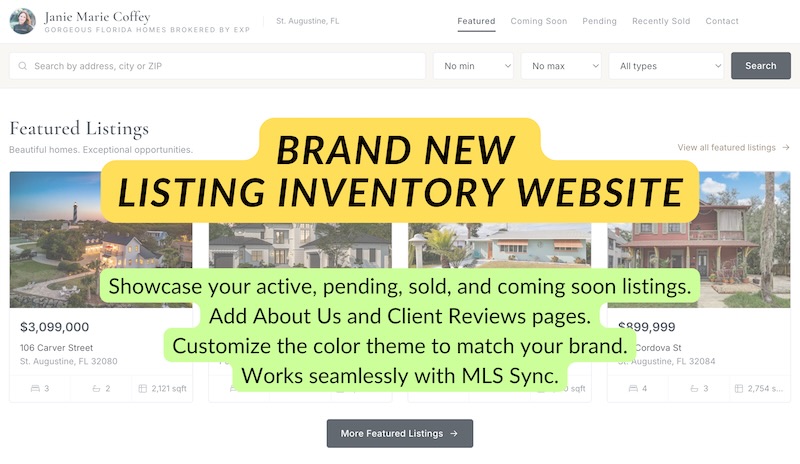
We just added a new way to share your listings from RealBird: a branded Listing Inventory website.
This is not meant to replace your main real estate website. Think of it as a simple, modern quick link to your current inventory that you can use anywhere.
You can add it to your Instagram or TikTok bio, email signature, text messages, digital business card, QR codes, listing presentations, social media profiles or anywhere else where you want to give people an easy way to see your listings.
Your Listing Inventory website can include:
- Your active listings
- Coming Soon listings
- Pending listings
- Recently Sold listings
- Your branding and custom colors
- About Us page
- Reviews page
- Contact and lead capture form
- A custom RealBird URL slug
For example, instead of sending someone to a long listing search URL, you can create a simple branded address that is easy to remember and share.
How it works
Your Listing Inventory website pulls listings directly from your RealBird account.
If you use RealBird MLS Sync, there is very little to manage.
Add a new listing to the MLS and RealBird imports it automatically. The listing is added to your RealBird marketing inventory and can appear on your Listing Inventory website automatically.
When the listing status changes in the MLS, RealBird keeps the listing updated as part of the normal MLS sync process.
If you do not use MLS Sync, that is fine too.
Listings that you manually add to RealBird can also be displayed on your Listing Inventory website.
So whether your listings come from an MLS connection or you enter them manually, you can maintain one simple inventory page to share with clients and prospects.
Customize it for your brand
You can customize the Listing Inventory website so it feels like part of your own marketing.
Choose your branded colors, add your information and create your own custom URL slug.
You can also add an About Us section to introduce yourself or your team and a Reviews page to highlight client testimonials.
The built-in contact form gives visitors an easy way to reach you while they are looking through your listings.
The goal is to keep the setup simple. You do not need to build another website or maintain another complicated system.
Use it as your listing quick link
One of the main reasons we built this is sharing.
Most agents already have a website, but sometimes you just want to send someone directly to your listings.
Your Listing Inventory website works well as:
- Your link in bio
- A QR code destination
- A link in your email signature
- A text message link to a new prospect
- A link from your social media profiles
- A listing presentation resource
- A simple inventory page for past clients and referrals
Instead of asking someone to navigate through your main website and find the property search, you can send them directly to your current inventory.
Keep your listings working together
The Listing Inventory website is another piece of the RealBird listing marketing system.
Your listings can already power individual property websites, landing pages, flyers, QR codes, social media marketing and other RealBird tools.
Now you can also organize those listings into one branded, easy-to-share inventory site.
If you have MLS Sync enabled, the process can be almost completely automatic.
List the property in the MLS, RealBird imports it, creates your marketing assets and keeps your inventory updated.
If you prefer to enter listings manually, the same Listing Inventory website works with those listings as well.
How to get started
Log in to your RealBird account and open the Listing Inventory website settings.
From there you can:
- Choose your custom URL slug.
- Select your brand colors.
- Add or update your About Us information.
- Add your reviews.
- Confirm your contact and lead capture information.
- Choose which listing categories you want to display.
- Publish your Listing Inventory website.
Once it is set up, copy the link and start using it anywhere you want to give people a quick way to see your listings.
If you already use RealBird MLS Sync, your inventory can continue updating as your listings change in the MLS.
If you manage listings manually, simply keep adding and updating them in RealBird as you do today.
The Listing Inventory website gives you one more simple way to turn that inventory into something you can actually share.