
We launched two feature updates for your RealBird listing marketing platform:
The Listing Inventory Website now has map-search
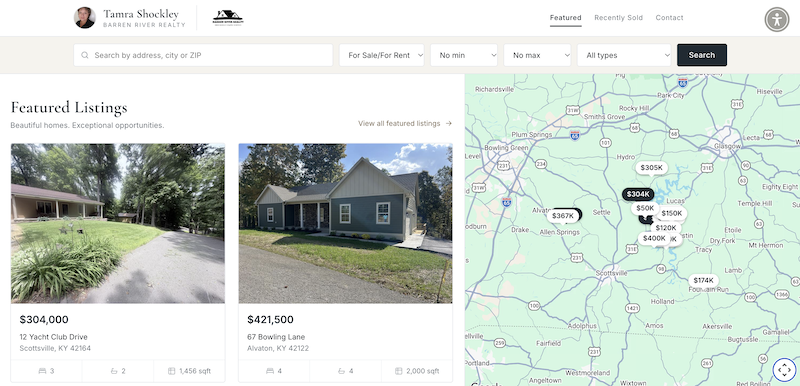
Example courtesy of Tamra Schockley
You can turn the map search feature on or off from your dashboard.
Attach PDF documents to your listings
This new feature makes your RealBird single property website an even more useful part of your listing marketing.
You can now upload up to 10 PDF documents per listing, including disclosures, floor plans, and other property documents. Give each document a title and description, and drag and drop them into your preferred order.
You can also control whether each document is available on the unbranded tours you add back to your MLS, or only on your branded marketing pages.
You’ll find the new document management page in your dashboard, under the Edit button for each listing.
Use your Listing Inventory Website as your Link-in-Bio
Your RealBird Listing Inventory Website also works as a Link-in-Bio website for Instagram, TikTok, and other social media profiles.
You can add any type of content with outbound links to your listing inventory website, giving your social media posts more context and directing visitors to additional resources, videos, articles, services, or anything else you’d like to share.
It’s a simple way to extend what you can do with Instagram and TikTok, where space for content and clickable links is limited.
Other recent updates
We’re continuing to expand MLS-sync to more markets where MLS fees and terms allow it.
Canopy MLS and Space Coast MLS are the two most recent additions to our supported MLS-sync integrations.
If you’d like to enable MLS-sync for your RealBird account, you can request setup directly from your dashboard.
As always, your feedback is most welcome and please send us your feature requests as well.